Feature Overview - Network Streaming With RTP, RTMP, RTSP, HLS, SRT, YouTube Live, and NDI
Cablecast's network streaming capabilities allow Flex and VIO servers to play out live network streams from a variety of sources, including RTP, RTMP, RTSP, HLS, SRT, YouTube Live, and NDI. This article will provide an overview of each supported stream type as well as instructions for creating streams and playing them as both scheduled events and manually using force events.
The Network Streams feature is included in Cablecast without any additional licensing. However, a VIO or Flex video server is required for these features.
Protocols versus Codecs
Before diving into the different streaming protocols Cablecast supports, it's important to understand the difference between a streaming protocol and the encoding of the audio and video the stream carries. This article focuses primarily on streaming Protocols. Protocols define how a stream is transmitted across the network and sometimes how the client and server initiate a session. Containers, or transport formats, describe how data is divided into streams, segmented, and sent over the network, and usually contain metadata about the compressed audio and video within. For our purposes, the most common container is the MPEG Transport Stream, used with the RTP and HLS protocols. Finally, a Codec describes how raw audio and video are compressed. While some protocols, such as HLS and RTMP, are fairly strict about the containers and codecs they support, others, such as RTP, are much more flexible. For use in Cablecast, we recommend the following encoder settings.
VideoCodec | AVC / h264 |
|---|---|
Bitrate | 2-10 Mb/s |
Frame Size | 1920x1080, 1280x720, 720x486 |
Frame Rate | 29.97 or 59.94 fps |
GOP Size | 2 sec or 60 frames |
Audio Codec | AAC-LC |
Sample Rate | 48Khz |
Channels | 2 (stereo Pair) |
Protocols
RTP
Overview
RTP or Real-time Transport Protocol is a commonly supported protocol used for the delivery of audio and video streams over IP networks. RTP usage is not limited to video streaming. In fact, many IP-based telephone systems use RTP for media delivery. RTP supports both unicast (one-to-one) and multicast (one-to-many) delivery. The multicast support specifically makes RTP an efficient choice when you have multiple locations that want to receive the same network streams on the same network.
Network Considerations
If using multicast, plan your network carefully. In particular, multicasting audio/video over a Wi-Fi network can significantly reduce network performance.
RTP is sent over IP networks using UDP. Unlike TCP, UDP does not confirm packet delivery — this is commonly referred to as "fire and forget." This makes RTP more efficient, allowing for higher data rates and lower latency, but also less suitable for networks that experience high rates of packet loss, such as the public internet.
With RTP, the connection is initiated by the encoder, which means the encoder must be able to reach the Cablecast video server. Any firewalls between the encoder and the video server must be configured to accept inbound traffic on the port RTP is using. Note that RTP ports must be even-numbered (e.g., 4444, 4446) — odd-numbered ports are reserved for RTCP (RTP Control Protocol).
Cablecast Specifics
For use in Cablecast, the RTP stream must contain an MPEG Transport Stream containing audio and video matching the above-defined encoder settings.
Summary
When To Use: Local Area Networks and I-nets.
When to Avoid: Bad networks/internet.
Pros: Low latency, very common
Cons: Packet Loss, Network Configuration
RTSP
RTSP, or Real Time Streaming Protocol, is a protocol designed for controlling media servers. It uses VHS-style commands such as PLAY and RECORD to control media operations, with the Cablecast video server acting as the client. RTSP handles session control only — actual audio and video transmission is delegated to RTP.
Network Considerations
With RTSP, the Cablecast video server initiates the connection with the RTSP encoder, so firewalls between the two must allow inbound traffic on the RTSP port. The default port is 554, but this can vary depending on your encoder.
If the client and server cannot negotiate a UDP port for RTP transmission — most likely when the Cablecast video server is behind a firewall — RTSP can fall back to embedded TCP. Note that not all servers implement this interleaved fallback, in which case the stream will timeout and fail.
Summary
When To Use: When a remote location has a static IP and an RTSP server can be poked through the firewall.
When to Avoid: When the remote location is unknown.
Pros: Low latency, very common, can work around firewalls better than RTP
Cons: Packet Loss, Network Configuration
RTMP
RTMP, or Real Time Messaging Protocol, was originally developed as a proprietary protocol for streaming video and audio over the internet. Adobe later acquired the protocol and released an incomplete specification. Despite its shortcomings, RTMP is widely adopted and remains one of the most common protocols for network streaming. Major platforms such as Twitch, YouTube, and Facebook all accept RTMP as an ingest protocol, and as a result, a wide variety of commercial and open-source encoders support it.
Network Considerations
There are three roles in a typical RTMP streaming session.
Encoder - Encodes the audio/video and pushes it to the RTMP server
Server - Receives RTMP streams from the encoder and pushes them to connected clients.
Client - Requests RTMP streams from an RTMP server
Using RTMP in Cablecast requires a third-party RTMP server such as CablecastRTMP, Wowza, or Nginx RTMP.
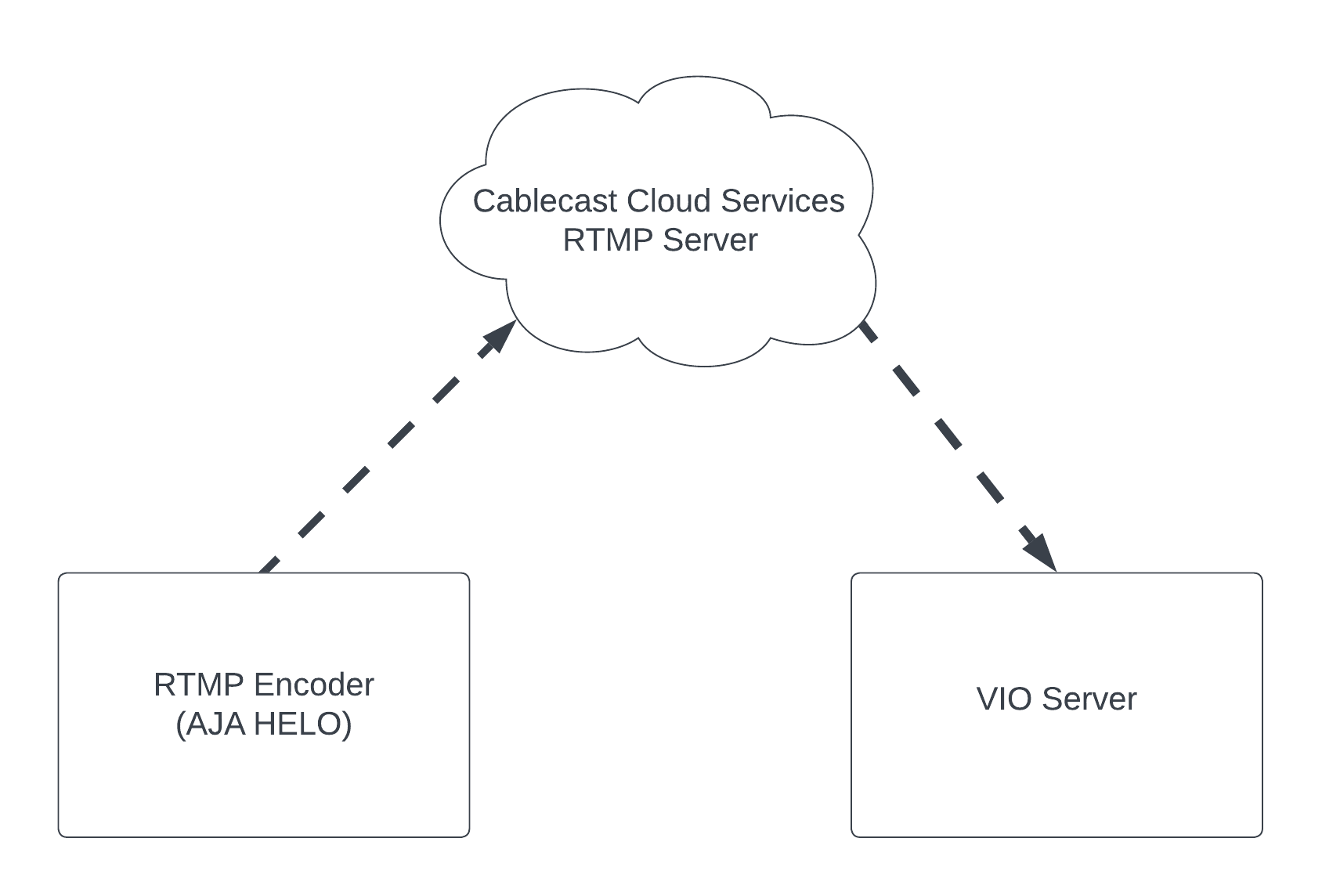
In the diagram above, the Cablecast VIO or Flex server acts as the client, and the AJA HELO acts as the encoder. Streaming RTMP from the encoder to the client VIO server requires a third-party RTMP server.
Subscription based
Pairs well with Cablecast
Easy to set up and use
Cloud-based (no hardware)
Can simulcast to Facebook and YouTube, as well as other services that can provide a stream URL/stream key
Beyond that, the two widely used RTMP servers are
Closed source non-free
Does much more than RTMP
RTMP module for open source Nginx web server
OBS has a good article on building on a Raspberry Pi
RTMP uses TCP, which guarantees packet delivery through acknowledgements and retransmission of lost packets. This makes it a reliable option for streaming over the public internet.
RTMP requires a third-party server, which adds some initial setup complexity but also enables more flexible deployments. Because the RTMP server can be hosted on the public internet or in the cloud, it works well in situations where neither the encoder nor the Cablecast video server can be configured for RTP or RTSP.
If the RTMP server is behind a firewall, inbound traffic must be allowed on the TCP port it is listening on. The default port is 1935, but most server software allows this to be changed.
Summary
When To Use: Over the public internet when neither the encoder nor the client location network configuration can be modified.
Pros: Very common. Requires no network configuration when RTMP server is in cloud. Commercially supported RTMP services are available.
Cons: Higher latency, requirement of third-party server.
HLS - HTTP Live Streaming
HLS, or HTTP Live Streaming, is a protocol developed by Apple to deliver live video and video on demand to Apple devices. As the primary streaming protocol for Apple platforms, it is widely adopted. HLS is a distribution protocol, meaning it is designed to deliver video and audio to end viewers at scale, leveraging standard HTTP servers and content delivery networks to support millions of concurrent viewers.
The main tradeoff with HLS is latency — video and audio may be delayed by as much as 60 seconds from capture to playback. Despite this, the widespread availability of HLS streams makes it a convenient input source for Cablecast. Some examples of content available as HLS include:
Other Cablecast systems (Cablecast Live outputs an HLS stream that can be played out on your channel)
Free Speech TV
Classic Arts Showcase
Always obtain express written permission from copyright holders before rebroadcasting any live stream. For that reason, stream links for the above are not included here.
HLS also supports ABR (adaptive bitrate streaming), which allows the client to select stream quality based on screen size and available bandwidth. This can be helpful if your Cablecast system has limited bandwidth, though we generally recommend using network streams on fast, reliable connections.
Network Considerations
HLS is served over standard HTTP connections on port 80 (non-secure) or port 443 (secure). Your Cablecast system will access the stream over these ports, so any firewall in front of the HLS server must allow inbound traffic accordingly. Because HLS is primarily a distribution protocol, most publicly available HLS streams already have the appropriate firewall rules in place.
When using HTTPS, the HLS stream must be served with a valid certificate — self-signed certificates will cause playback to fail.
Summary
When To Use: Over the public internet when the desired stream is already available via https.
When To Avoid: When low latency is required.
Pros: Very common, usually no special network considerations.
Cons: High latency
YouTube Live (BETA)
YouTube Live is YouTube's live streaming platform, allowing channel owners to stream content directly to their YouTube audience. It accepts RTMP for ingest and is compatible with many commercial and open-source encoders. For station operators already streaming to YouTube, Cablecast's YouTube Live support makes it easy to pull that content back in for broadcast on your cable channel.
Note that rebroadcasting YouTube streams may conflict with YouTube's terms of service. When possible, it is preferable to simulcast to both YouTube and Cablecast independently. Additionally, YouTube may change their APIs at any time, which could affect this feature without notice.
Network Considerations
Cablecast's YouTube Live support works by analyzing the YouTube page to retrieve the HLS stream for a live event. For this to work, the YouTube account owner must enable embedding of live streams in their YouTube Studio settings.
Enabling Embedding on YouTube Live Videos
Enabling Embedding in YouTube Studio
Navigate to YouTube Studio.
Click Go Live in the top right corner, between the Upload Videos and Create Post buttons.
When prompted for a start time, select Later.
Select Streaming Software as your stream type.
In the top left, click Stream Settings.
Click Edit next to the title of your stream.
Under the Details tab, scroll down to the License section.
Check the Allow Embedding box below the license field.
Click Save.
Embedding will now be enabled for your streams going forward.
Summary
When To Use: When you are already broadcasting to YouTube, and you have limited bandwidth at the encoder site.
When To Avoid: When it's not your content.
Pros: Easy to use / setup. No special network considerations.
Cons: Not officially supported by YouTube, could break at any time.
SRT
SRT (Secure Reliable Transport) is an open-source video transport protocol optimized for unpredictable networks such as the public internet. For more details on configuring SRT streams in Cablecast, see our SRT setup guide.
NDI
NDI (Network Device Interface) is a protocol developed by NewTek that enables easy discovery and delivery of broadcast-quality video over a standard gigabit LAN. The protocol is freely available, which has led to wide adoption across a broad range of software and hardware products.
Network Consideration
NDI is designed for use on a Local Area Network and includes automatic device discovery, allowing compatible devices on the network to recognize and access available NDI sources.
Summary
When to Use: NDI-compatible devices are already available on the network.
When to Avoid: Slow network conditions, such as a slow link between two LANs.
Pros: Low Latency, High-quality, Can use sources like Tricaster
Cons: Not meant for use over the internet
Using Live Streams In Cablecast
Be sure to check out this article for an overview on how to configure and use Network Streams in Cablecast.
